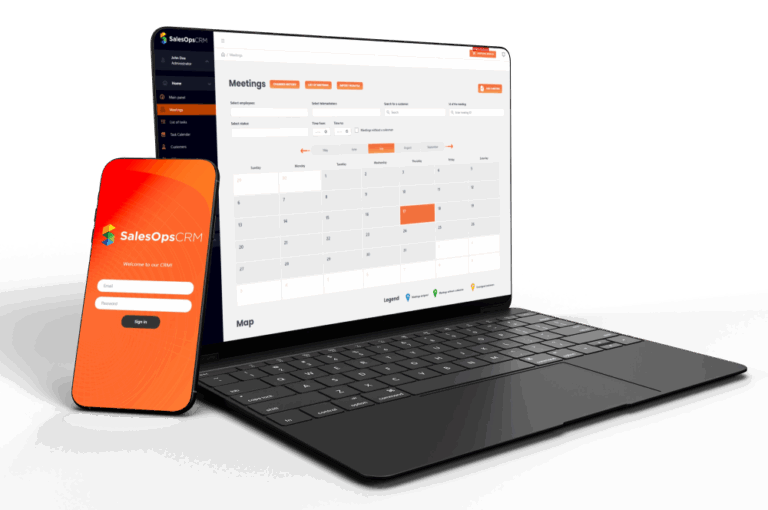
CRM for project management
CRM for project management means that regardless of the industry, the ability to efficiently organize tasks and monitor project progress allows for effective use of resources and achieving goals in a specific time. In today’s dynamic corporate world, efficient project management is becoming crucial to achieving success. Complex projects require comprehensive organization and coordination of activities, and modern CRM systems help in this. The „Projects” module in the SalesOps CRM system is a powerful tool that makes it easy to organize tasks, monitor progress and increase the efficiency of the entire team. In this article, we will look at how the SalesOps CRM system can support project management, focusing in particular on the possibilities of the „Projects” tab.
Project Management in CRM SalesOps
Integrating project management with CRM opens up new organizational and operational opportunities for companies. CRM, or customer relationship management, is not only a tool for tracking interactions and sales, but also a powerful support for effective project management. With the „Projects” module in SalesOps CRM, companies can centralize all project-related information in one place, which facilitates collaboration and communication between teams.
Additionally, integrating project data with customer data allows for a better understanding of their needs and expectations. This in turn translates into a more personalized approach and higher quality of services provided. In addition, the SalesOps CRM system enables automation of many project processes, such as creating tasks or assigning responsibilities, which significantly increases work efficiency and minimizes the risk of errors.
As a result, CRM becomes not only a tool for managing customer relationships, but also a comprehensive solution supporting comprehensive project management in the company. With this, companies can better organize their activities, respond faster to customer needs and more effectively implement their business goals.
What is project management in CRM?
Project management in CRM is the process of planning, organizing, controlling and implementing projects with specific goals, deadlines and budgets. It includes a number of activities, such as:
- Defining the project goals and scope
- Division of the project into tasks
- Assigning tasks to team members
- Setting deadlines and budgets
- Progress monitoring
- Risk management
- Communication with the team and clients
- Troubleshooting
Why is project management in CRM important?
Effective project management is key to achieving business success. Here are some reasons why it is worth investing in project management tools:
- Better organization: Thorough organization of tasks and projects allows for clear definition of goals and deadlines, which in turn increases team efficiency.
- Track progress: Monitoring project progress allows you to quickly respond to potential issues and better manage your time and resources.
- Assigning responsibilities: Clearly assigning tasks to specific employees helps to better separate responsibilities and increases accountability for the implementation of individual tasks.
- Automation: Process automation saves time and minimizes the risk of errors, which is especially important in large projects.
- Project archiving and history: Storing completed projects in an archive allows you to easily track the history of your work, which can be helpful when planning future projects.

How does CRM simplify project management?
The „Projects” module in the SalesOps CRM system offers a number of functions that support the project management process at every stage:
1. Adding and configuring projects
The process of adding new projects is intuitive and simple. Just click the „Add project” button to then give the project a name, set its status, priority and deadline. Additionally, you can assign the project to a specific client, which makes it easier to track cooperation and the implementation of tasks for individual clients. After entering all the data, just click „Save” and the project will be added to the project list.
- Ability to create new projects and give them a name, status, priority, deadline and assign a client.
- Adjusting project parameters to its specificity.
2. Creating tasks and assigning them to employees
After creating a project, the user has the option of adding tasks that will make up a specific project. In the project details, you can not only add new tasks, but also edit existing ones, which allows for flexible management of the team’s work. Tasks can be assigned to specific employees, which ensures clarity in the scope of responsibility and allows for a better division of duties.
- Add new tasks within the project and define their details such as description, due date, responsible person, and priority.
- Assigning tasks to specific employees, making it easier to account for responsibilities and monitor progress.
3. Monitoring progress and time management in projects
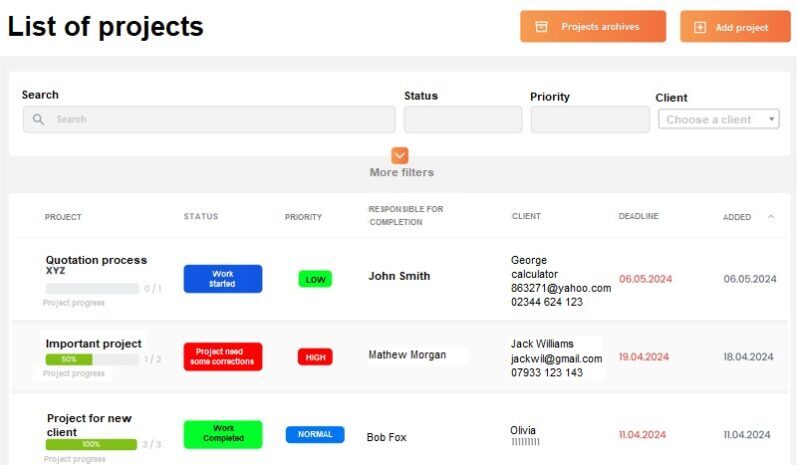
The CRM system offers a clear view of all projects and tasks, allowing users to track their implementation status. This allows you to monitor progress and manage your time effectively. Additionally, CRM allows you to filter and sort projects by various criteria, making it easier to quickly find the information you need. This improves the management of multiple projects at the same time, providing better work organization.

- Access to a clear view of all projects and tasks, along with their implementation status.
- The ability to filter and sort projects according to various criteria, making it easier to quickly find the information you need.
4. Automation of processes in projects
One of the most important aspects of project management in our SalesOps CRM is the ability to automate processes. Users can define specific conditions under which tasks will be created automatically. For example, if a certain stage of the contract is reached, the system can automatically generate a corresponding task, which significantly improves time and resource management. Process automation helps avoid manual errors and ensures that all steps are carried out according to plan.
- Creating automatic rules that allow tasks to be automatically created in specific situations.
- Saving time and eliminating routine activities, allowing employees to focus on more demanding tasks.
5. Archiving projects
Completed projects can be easily moved to the archive, which helps keep the system organized and clear. You can review archived projects at any time, and even restore them to the active list if necessary.
- Possibility to move completed projects to the archive, which ensures order in the project database.
- Access the project archive to review history and gain valuable information for future projects.
6. Communication and cooperation in project management

Effective project management requires efficient communication and close cooperation within the team. In the CRM system, both of these needs are met with the ability to comment on tasks and access to the central „Files” repository. Team members can add comments directly to tasks, sharing information, comments and suggestions. All important messages are available in one place, which eliminates the need to use other communication tools, increases transparency and allows for quick response to emerging issues.
In addition, the central repository „Files” allows you to collect and share all necessary documents related to the project in one place. Users can store and share files such as specifications, reports, presentations or contracts. With this, each team member has access to the current versions of documents, which eliminates the problem of information dispersion and ensures consistency in the team’s work. In addition, centralization of documents makes it easier to quickly find the necessary materials, which speeds up the implementation of tasks. As a result, the team can work more efficiently and avoid misunderstandings resulting from the lack of current information.
- The ability to comment on tasks and projects, which facilitates team communication and the exchange of information.
- Access to a central repository of project-related documents.
Conclusions
The „Projects” tab in the SalesOps CRM system is an invaluable tool for any company that wants to effectively manage its projects. Intuitive project addition, the ability to manage tasks, assign responsibilities, and process automation are just some of the features that make project management easier and more effective. With this tool, companies can better organize their work, track progress, and achieve their goals in a more organized and thoughtful way.
Remember!
Using SalesOps CRM system for project management can provide a number of benefits, including:
- Shorter project turnaround time
- Lower project costs
- Higher customer satisfaction
- Improved team communication
- Increased work efficiency